

Why Vision AI Matters Now: A concise overview and what this article will deliver
Imagine machines that can "see" and understand the world around them, just like us. That’s what vision AI is all about. This special type of artificial intelligence gives computers the power to interpret digital images and videos, not just store them away. In 2026, this field is more important than ever. Instead of just looking at raw data, vision AI systems can give us smart ideas about what’s in a picture or video, such as spotting objects, faces, or text. This makes vision AI a truly hot AI topic.
For professionals who love technology, understanding vision AI is key.

It’s not just a cool new gadget; it’s a strategic tool that can change how businesses work. The computer vision market is growing fast, expected to be worth $32 billion in 2026, reshaping nearly every industry you can think of Computer Vision in 2026.
So, why are so many organizations putting vision AI first? It helps them achieve three big things:
- Automation: Vision AI helps machines do tasks that used to need human eyes. Think about checking products for flaws in a factory or guiding robots in a warehouse. These systems can work quickly and without getting tired Vision AI Trends 2026.
- Better Information: Computers can look at visual data and find insights that humans might miss. This can lead to smarter business choices. For example, understanding how customers move in a store or seeing changes in crops from drone footage.
- New Products and Services: Vision AI opens the door to creating amazing new things. Self-driving cars use it to understand the road, medical tools use it to help doctors, and even security systems get smarter with it. In fact, how artificial intelligence with images is transforming business in 2026 is a topic many businesses are focused on right now.
This article will help you understand this exciting field better. We will explore what vision AI truly means, look at different types of artificial intelligence explained, and show you how it’s being used in real-world AI projects today. By the end, you’ll have a clearer picture of how vision AI helps organizations achieve their goals in 2026.
Staying up to date with the fast pace of AI news can be tough. Get clear daily AI updates from The AI Newsletter Worth Reading.
Vision AI might seem like magic, but it works through a series of clear steps, often called a pipeline. Think of it like a factory line where raw visual information goes in, and smart insights come out. In 2026, these pipelines are very advanced, making vision AI more powerful than ever.
Core Steps in a Vision AI Pipeline
A typical vision AI system has several main parts that work together to "see" and understand images or videos.
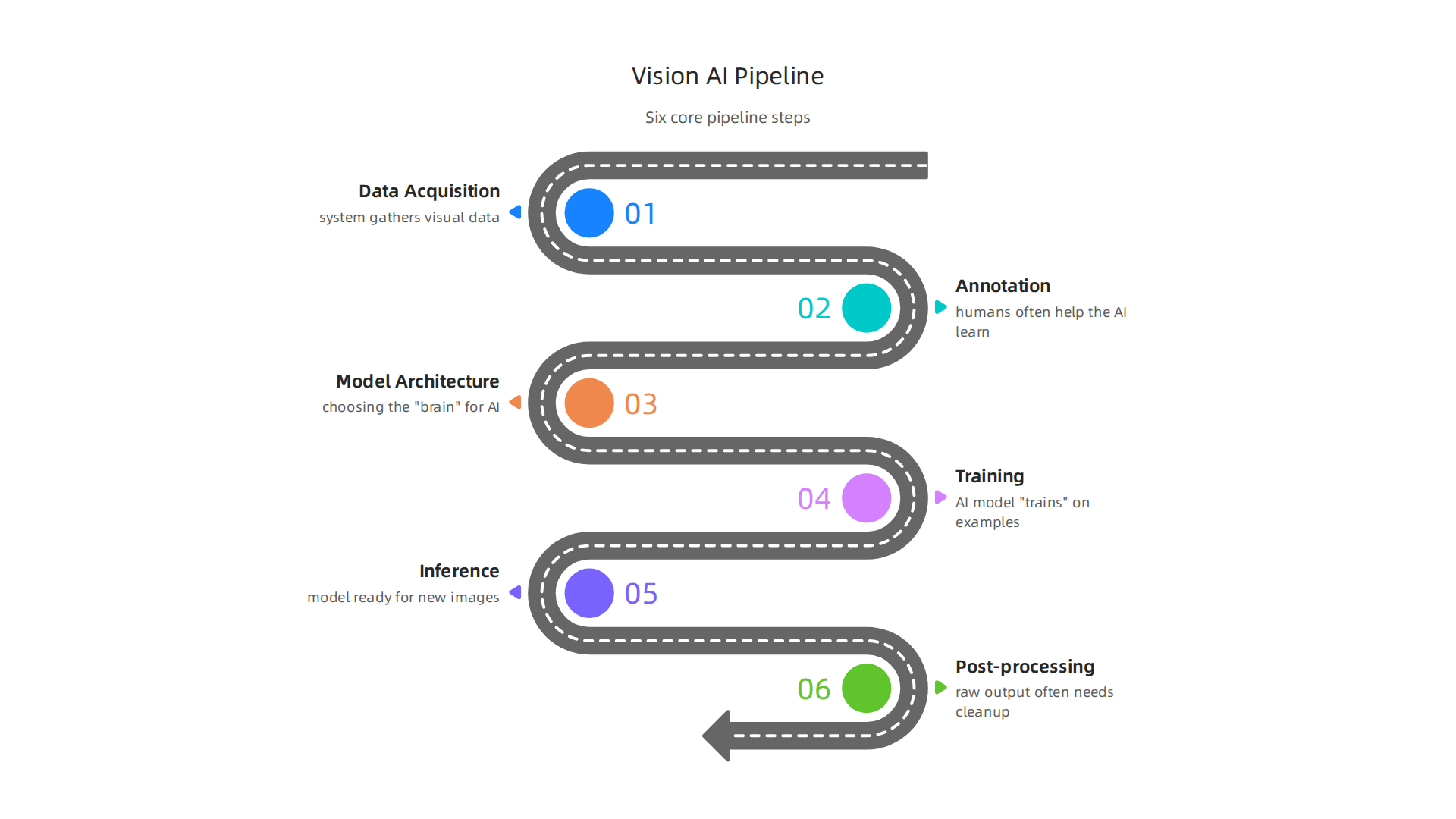

Here’s a look at these important building blocks:
- Data Acquisition: This is the first step, where the system gathers visual data. This could be pictures from cameras, live video feeds, or even 3D scans. Getting good quality data is super important because bad data will lead to bad results.
- Annotation: Once data is collected, humans often help the AI learn by labeling what’s in the images. For example, drawing boxes around cars in a picture and labeling them "car," or marking faces as "person." This labeled data acts like a teacher for the AI. Tools like CVAT or Labelbox are often used for this process Building End-to-End Vision MLOps.
- Model Architecture: This is like choosing the "brain" for the vision AI. It’s the design of the AI model that will learn from the data. Older systems used simpler ways to find features, but modern vision AI uses complex neural networks, especially those based on "transformers."
- Training: With lots of labeled data, the AI model "trains." It looks at the labeled examples and tries to figure out patterns. It learns to tell the difference between a cat and a dog, or to spot a defect on a product. This step needs a lot of computing power.
- Inference: After training, the vision AI model is ready to work on new, unseen images or videos. This is called "inference." The model uses what it learned to make predictions or decisions in real time. For example, it can identify objects in a live video stream or guide a robot Best Architecture for Real-Time Vision AI Systems. Depending on the task, inference might happen right on the camera (edge AI) or in a large cloud data center Edge AI vs Cloud AI for Computer Vision.
- Post-processing: The AI’s raw output often needs a little cleanup or extra steps. This might involve smoothing out shaky predictions, combining results from different parts of an image, or turning the AI’s findings into an action, like sending an alert or controlling a machine.
This whole process is often called a computer vision pipeline, and most real-time systems follow similar stages: capture, decode, preprocess, inference, post-process, track, and then act What are the main steps in a typical Computer Vision Pipeline?.
Modern Vision AI: Smarter Than Ever
In 2026, vision AI has moved beyond older, simpler ways of seeing. Traditional computer vision pipelines focused on finding basic shapes or colors. Today, the field is much more advanced, especially with new types of AI for humans and machines.
- Transformer-based Vision Models: Instead of just looking for small, separate features, new models called "vision transformers" can understand the bigger picture. They look at how objects relate to each other and the overall scene. This helps them understand context, making them much better at complex tasks than older methods Computer Vision in 2026: $32B Technology Reshaping Every ….
- Multimodal Fusion: Imagine an AI that doesn’t just see with one "eye" but many. Multimodal fusion means combining data from different sources. This could be regular color images (RGB), infrared images, depth sensors, or even radar Computer Vision Trends 2026: Autonomy, Digital Twins …. By blending these different views, the AI gets a much richer understanding of the environment. This is crucial for advanced AI projects like self-driving cars, where understanding everything around is key.
- 3D Understanding: A big trend in 2026 is vision AI’s ability to truly understand the world in 3D, not just flat pictures. This means it can grasp the depth, size, and position of objects in a space, which is super important for robotics and virtual reality applications Computer Vision Breakthroughs of 2026.
These new methods make vision AI very powerful. They allow systems to be more accurate and understand the visual world in ways that were not possible just a few years ago. This helps businesses make smarter decisions and create more advanced products. For those looking to dive deeper into the future of this field, exploring the Computer Vision AI Roadmap for 2026 Business Decisions can provide valuable insights.
With vision AI now smarter than ever thanks to new models and ways of seeing, it’s helpful to understand what these powerful systems can actually do. Vision AI doesn’t just "see" things; it performs many specific tasks. These tasks are like the special skills that make different types of AI useful for different jobs, making them hot AI topics for many AI projects.
What Vision AI Can Do: The Core Tasks
Here are the main things vision AI systems are good at in 2026:
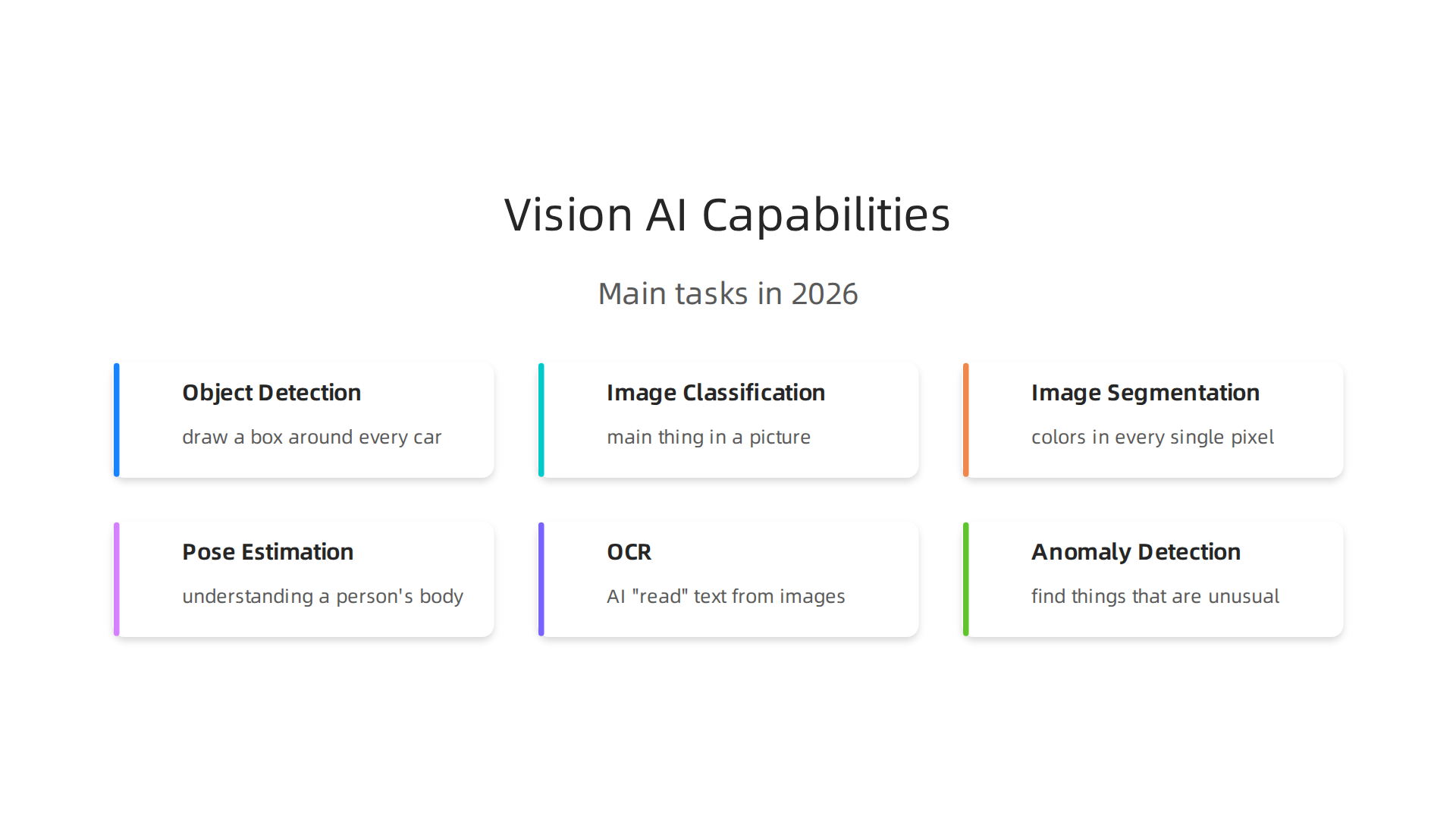
- Object Detection: Imagine you have a picture of a street. Object detection means the vision AI can draw a box around every car, every person, and every traffic light, and then label what each thing is. It answers the question, "What is here, and where is it?" This is key for things like self-driving cars. Top models like RF-DETR are leading in this area for 2026 Best Computer Vision Models in 2026.
- Image Classification: This is a simpler task. The AI looks at an entire picture and says what the main thing is. For example, if you show it a picture of a dog, it says "dog." If you show it a picture of a cat, it says "cat." It answers, "What is this whole picture about?"
- Image Segmentation: This goes a step further than detection. Instead of just drawing a box, segmentation colors in every single pixel that belongs to an object.
- Semantic Segmentation: This means coloring all pixels that are part of the same type of thing with the same color. So, all cars might be blue, and all people might be red, even if they are different cars or different people.
- Instance Segmentation: This is even more detailed. It colors in each individual object with a different color. So, Car 1 is blue, Car 2 is green, Person 1 is red, Person 2 is yellow. It helps the AI understand each item distinctly.
- Pose Estimation: This is about understanding how a person’s body is positioned. The AI can find key points like elbows, knees, and shoulders, then connect them to figure out if someone is standing, sitting, running, or falling. This is useful for sports analysis or safety monitoring.
- Optical Character Recognition (OCR): This capability lets vision AI "read" text from images. Whether it’s a license plate, a street sign, or a page from a book, OCR can turn those picture letters into text that a computer can understand and use. This is powerful for many business operations.
- Anomaly Detection: This skill helps AI find things that are unusual or don’t fit in. For example, in a factory, vision AI can look at products coming down a line and spot a defect or something wrong that a human might miss. This is very important for quality control in manufacturing The Enterprise Vision AI Adoption Report 2026. It’s about finding the unexpected, even if it hasn’t seen that exact "wrong" thing before A Benchmark for Anomaly Segmentation.
Balancing Speed and Accuracy in Vision AI
When building vision AI systems, especially for real-time uses, businesses often face a big choice: how fast does it need to be, and how accurate does it need to be?
- Accuracy vs. Latency: Accuracy means how right the AI is. Latency means how fast the AI can give an answer. Often, making an AI more accurate can make it slower, and making it faster can make it less accurate. Finding the right balance is a key challenge for any vision ai project. For example, a self-driving car needs very high accuracy and very low latency (speed) to make safe decisions quickly. Different AI models are tested to find the best mix for speed and correctness A Systematic Assessment of Embedded Neural Networks.
- Edge vs. Cloud Inference: As mentioned before, where the AI "thinks" matters.
- Edge AI means the processing happens right on the device, like a camera or a robot. This is faster because data doesn’t have to travel far, but these devices have less computing power.
- Cloud AI means the data is sent to powerful computers in a data center (the cloud) to be processed. This allows for more complex AI models and higher accuracy, but it can be slower due to internet travel time. The choice depends on the AI’s job and the available resources A Comprehensive Evaluation of Deep Learning Object Detection Models on Heterogeneous Edge Devices.
- Data Needs: No matter how good the AI model or how fast the processing, good quality data is still the most important thing. Just like a student needs good textbooks to learn, vision AI needs lots of well-labeled images and videos to learn effectively. Building good vision data pipelines is essential for strong AI performance.
These core capabilities, along with careful thought about speed, accuracy, and data, show how versatile and powerful vision AI truly is in 2026. For those wanting to keep up with the daily shifts in this fast-moving field, staying informed is critical.
The world of AI is always moving fast. To stay on top of the latest advancements, you need clear, daily updates. If you want to understand how different types of AI, including vision AI, are changing the world, consider reading The AI Newsletter Worth Reading.
Vision AI is not just smart; it’s also very useful in many different kinds of businesses. The skills we talked about earlier, like finding objects or spotting things that are unusual, help companies work better and smarter. Let’s look at how vision AI is used in 2026 across different industries.
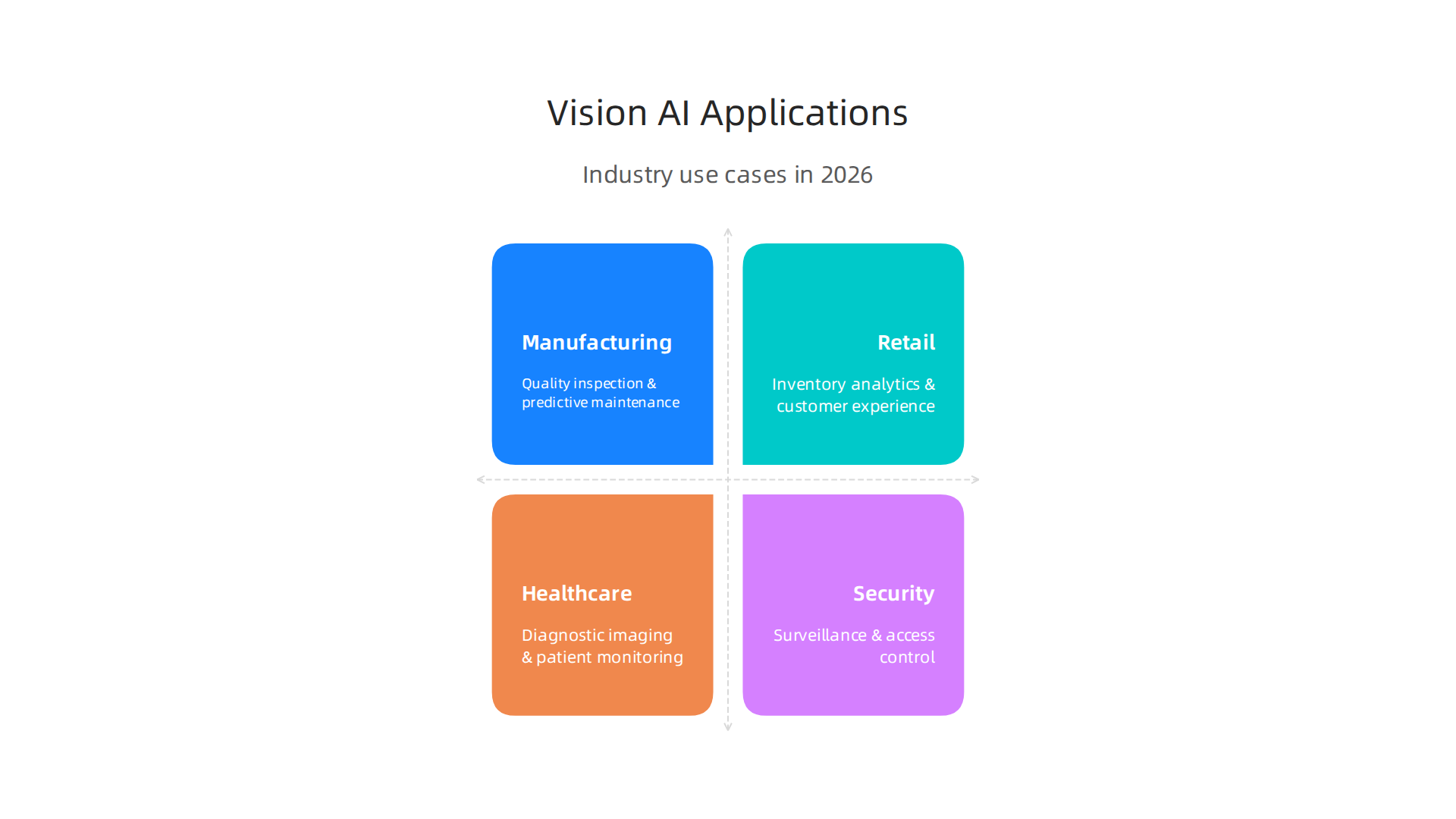
Manufacturing
In factories, vision AI is a big deal. It helps make sure products are made correctly and machines are running well.
- Visual Quality Inspection: Imagine a factory making car parts. Vision AI systems can look at each part as it comes off the line. Using its object detection and anomaly detection skills, it can spot tiny flaws or defects that a human eye might miss. This means fewer bad products get sent out. Actually, 68% of manufacturing projects in 2026 are focused on reducing defects this way, creating what’s called a "closed-loop system" where problems are found and fixed quickly Roboflow’s Visual AI Trends 2026 Report.
- Predictive Maintenance: Vision AI can watch machines and notice small changes. For example, it might see a part shaking too much or a tiny crack starting to form. By using pose estimation or anomaly detection, it can predict when a machine might break down. This helps factories fix things before they cause big problems, saving a lot of money and keeping things running smoothly. This kind of real-time AI in 2026 delivers millisecond decisions across industries, which is vital in manufacturing.
Companies using AI in manufacturing expect big improvements, like about 27% better equipment use and 23% less waste AI in Manufacturing 2026: From pilot value to scaled industrial impact.
Retail
Stores use vision AI to make shopping better and manage their products.
- Inventory Analytics: Vision AI cameras can watch shelves and automatically know which items are running low. This uses object detection and image classification. It helps stores keep shelves stocked and avoid customers getting upset because something is out of stock. For retailers, this can lead to 3 to 8 times their money back in the first year by stopping "out-of-stock" problems, meaning more sales.
- Customer Experience and Security: AI can help understand how people move around a store, what they look at, and what they buy. This helps stores put items where customers are most likely to see them. It also helps with security, spotting unusual behavior or theft, using anomaly detection.
Healthcare
Vision AI is changing how doctors and hospitals work, making things safer and more accurate for patients.
- Diagnostic Imaging: This is a huge area for vision AI. When you get an X-ray, MRI, or CT scan, vision AI can look at those images. It uses image classification and segmentation to help doctors find diseases like cancer earlier or see broken bones more clearly. In fact, most healthcare projects in 2026 that use vision AI are for imaging and helping doctors make decisions 2026 Top Vision AI Use Cases Across 10 Industries – Roboflow Blog. It’s amazing to think that 81 percent of radiology departments use AI in medical imaging in 2026.
- Patient Monitoring: In hospitals or care homes, vision AI can watch patients to make sure they are safe. Using pose estimation, it can detect if an elderly person has fallen or if a patient is trying to get out of bed when they shouldn’t.
Security
Vision AI makes security systems much stronger.
- Surveillance and Access Control: For security cameras, vision AI can do more than just record. It can identify people or vehicles, flag unusual activity, or make sure only authorized people enter certain areas. This uses object detection and anomaly detection to keep places safe.
Tracking Business Success with Vision AI
When companies use vision AI, they need to know if it’s actually helping. There are special ways to measure this, called Key Performance Indicators or KPIs. Leaders should track these numbers carefully for their AI projects to see real value.
Here are some important things to track:
- Operational Efficiency: How much faster or smoother are things working now? If vision AI helps factory lines move quicker, that’s a win.
- Cost Savings: Is the company spending less money? Maybe fewer errors mean less wasted material, or less need for people to do repetitive checks. Many businesses report cost savings as a top benefit of using AI The State of AI in the Enterprise – 2026 AI report.
- Quality and Error Rate: Is the quality of products better? Are there fewer mistakes being made? This is especially important in manufacturing and healthcare.
- Decision Quality and Speed: Are people making better choices, and are they making them faster? Vision AI can give helpful information in a flash.
- Return on Investment (ROI): This is about how much money a company makes back compared to what it spent on the vision AI system. For example, visual inspection in manufacturing often gives a payback in 6 to 12 months, and a huge 10 to 30 times return on investment in the first year from stopping defect costs The Enterprise Vision AI Adoption Report 2026.
Tracking these KPIs helps businesses understand the true impact of their vision AI investments and how to use AI to drive business growth with practical applications in 2026. But here’s the thing: only about 25% of companies truly measure AI’s impact with clear KPIs, even though many more are using AI agents New Liferay Study Finds 54% of Companies Are Running AI Agents …. This shows there’s still a lot of room to get better at showing the real value of these hot AI tools.
Once a company decides to use vision AI and understands how to track its success, the next big step is figuring out how to actually put it into action. This means looking at important details like how you handle the data, how you manage the AI models over time, and where these smart systems will run. Getting these things right is crucial for any vision ai project to truly work.
Implementation Considerations: Data, MLOps, Integration, and Infrastructure
Starting any hot ai project requires careful thought about the groundwork. For vision AI, this groundwork is all about your data, how you manage your AI operations (MLOps), and where your AI lives.
Your Data Strategy: The Heart of Vision AI
Vision AI models learn from pictures and videos. So, the quality and amount of this data are super important.
- Dataset Collection: You need to gather many images or video clips that show what you want the AI to learn. If you’re building a system to spot defects in products, you need lots of pictures of both good and bad products.
- Annotation Quality: This is about labeling your data correctly. For example, if you have a picture of a broken car part, someone needs to draw a box around the crack and label it "defect." If these labels aren’t spot-on, the AI won’t learn well. Tools and good processes are key for this, often called "active learning" for smart labeling Building End-to-End Vision MLOps.
- Augmentation: Sometimes you don’t have enough data. Data augmentation means taking your existing pictures and making new ones by, say, flipping them, rotating them, or changing their brightness. This helps the AI learn more without needing to collect all new images.
- Privacy-Preserving Options: For some
ai projects, especially in healthcare or public spaces, the images might contain private information. You need ways to protect people’s privacy, like blurring faces or making sure data stays secure. - Data Versioning: As your project grows, your data will change. You’ll add more images, update labels, or fix mistakes. It’s vital to keep track of these changes, almost like saving different versions of a document. This is called data versioning, and it helps you know exactly what data was used for which AI model MLOps Best Practices (10 Practical Practices Teams Use). Companies use specific tools to track these "dataset version IDs" for better control Implements dataset version control using MLOps.
MLOps for Vision AI: Keeping Things Running Smoothly
MLOps stands for Machine Learning Operations. It’s like DevOps but for AI. It helps you manage your AI models from the moment you start building them to when they are used in the real world and beyond.
- Model Lifecycle Management: This means having a clear plan for how your AI models are made, tested, put into use, and updated. It’s a cycle that keeps your
vision aiworking correctly over time. - Monitoring: Once your AI is deployed, you need to watch it closely. Is it still making good predictions? Is it working as expected? Monitoring helps you catch problems early.
- Drift Detection: The world changes, and sometimes the real-world data starts to look different from the data the AI was trained on. This is called "data drift." If your AI isn’t spotting things as well as it used to, it might be due to drift. Detecting this helps you know when it’s time to retrain your model with new data. Benchmarks are often used to test how well AI models can spot new or unusual things, like in anomaly detection A Benchmark for Anomaly Segmentation and industrial anomaly detection Omni-AD: A Large-scale and Versatile Benchmark for Industrial Anomaly Detection.
Edge vs. Cloud Deployment: Where Your AI Lives
Deciding where your vision AI models will run is a big choice. It can happen on "the edge" (right where the cameras are) or in "the cloud" (on powerful remote servers), or a mix of both.
- Edge Deployment: This is when the AI processing happens directly on devices like smart cameras or special small computers, not in a central cloud. It’s great when you need super-fast decisions, like in a factory where a defect needs to be caught instantly. Edge deployment also helps with privacy because images don’t have to leave the location to be processed. This is especially important when there are strict rules about data, like with patient health records Best Architecture for Real-Time Vision AI Systems.
- Cloud Deployment: This is when your AI models run on powerful computers in a data center, accessed over the internet. The cloud is good for very complex models that need a lot of computing power, or when you have huge amounts of data. If your AI model is bigger than 50GB, the cloud is often the best choice Edge vs Cloud Computer Vision: Architecture Decision Guide.
- Hybrid Deployment: Many businesses use a mix of both. They might train their
ai for humansmodels in the powerful cloud but then send smaller, faster versions to run on edge devices. This gives them the best of both worlds: strong training and quick, local action On-Premises vs Cloud Computer Vision Deployments. Understanding these different types of AI setups is part of building a solid computer vision AI roadmap for 2026 business decisions.
By carefully planning these parts of your vision ai setup, companies can make sure their AI systems are robust, efficient, and truly add value.
Get clear daily AI updates from The AI Newsletter Worth Reading.
After carefully setting up your vision AI systems, there’s another very important step: thinking about the bigger picture. This means looking at the rules, how your AI affects people, and making sure it’s fair and keeps information private. For any company using hot ai or vision ai, these are not just good ideas; they are crucial things leaders must evaluate in 2026.
Major Ethical and Privacy Worries with Vision AI
Vision AI systems, which use cameras and images, come with special concerns.
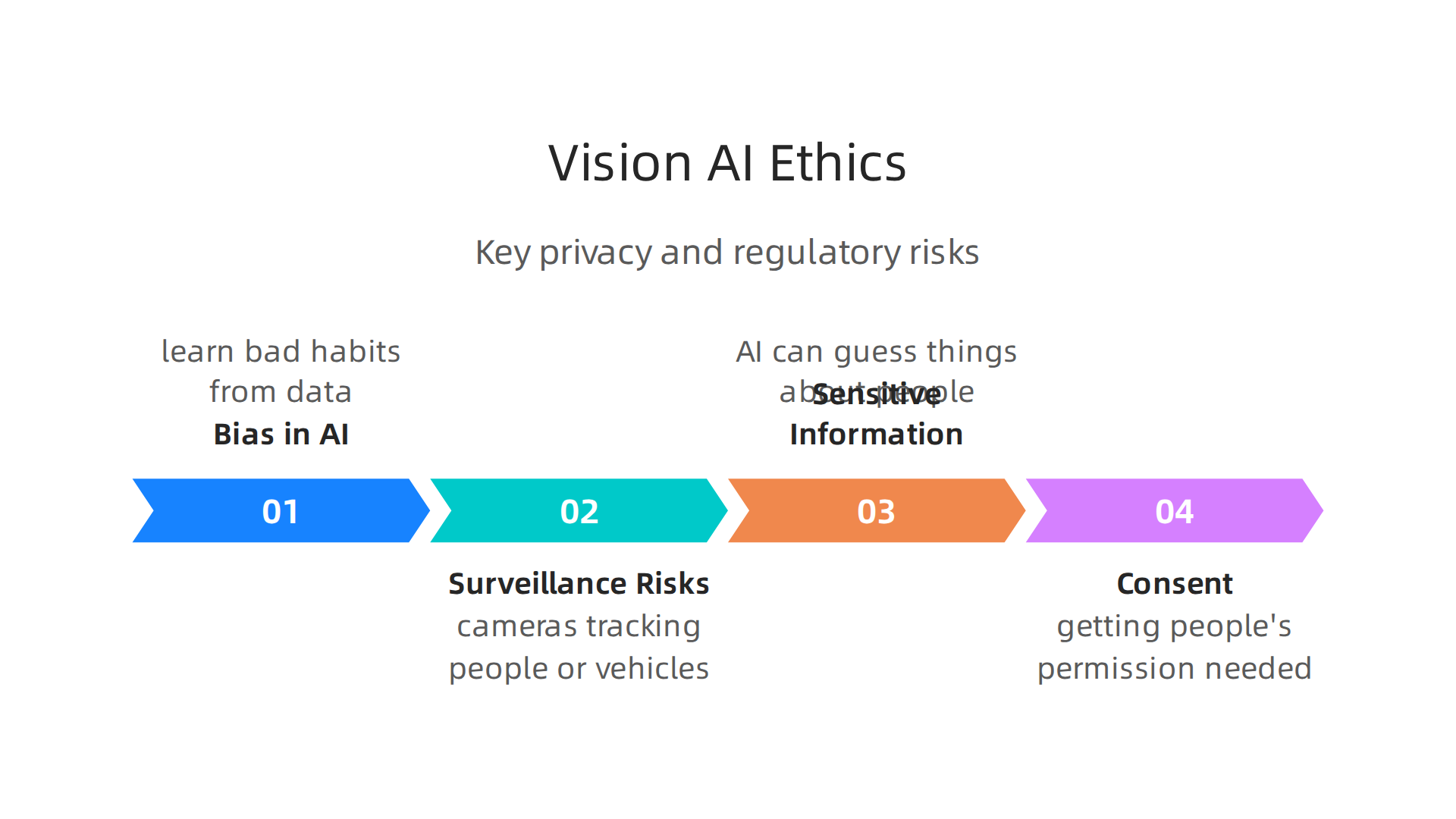

- Bias in AI: Sometimes,
vision aimodels can learn bad habits from the data they are given. If the training pictures don’t show many different kinds of people, the AI might not work as well for everyone. This can lead to unfairness or mistakes, which is a big ethical problem. For example, if facial recognition works better on some groups than others, it’s a bias issue that needs fixing Ensuring Privacy and Mitigating Bias in Publicly Available Datasets. Dealing with bias is a key part of usingai for humansresponsibly Towards a Standard for Identifying and Managing Bias in Artificial …. - Surveillance Risks: Using cameras for things like tracking people or vehicles can feel like always being watched. This raises questions about privacy and freedom. People worry about who sees the data, how it’s used, and if it could lead to them being followed without their knowledge.
- Sensitive Information: Vision AI can sometimes guess things about people just from their images, like their age, gender, or even their feelings. This is called inferring "sensitive attributes." Using or storing such information without good reason or permission is a big privacy risk. It’s vital to have ways to protect this kind of private data, like blurring faces or processing images right where they are taken, not in a central cloud Both ends of artificial intelligence impacting privacy: a review of violation and protection.
- Consent: When you collect images of people, getting their permission, or consent, is often needed. It’s about respecting people’s right to control their own image and data. Clear rules around consent are important for
ai projectsthat involve the public.
Rules and Good Practices for AI
Governments and groups are creating new rules to make sure different types of ai are used safely and fairly. Leaders need to pay attention to these.
- Understanding the Rules: In 2026, there are more laws than ever about how AI should be used. For example, governments are working on rules that require checking AI for fairness and protecting individual rights Accelerating Responsible Use of Artificial … Intelligence at GSA. The US government has also issued executive orders to guide agencies on using AI responsibly and minimizing harms Highlights of the 2023 Executive Order on Artificial …. Knowing these laws is key for compliance.
- Setting Up Governance: This means having clear internal rules and teams to watch over your AI systems. It’s about making sure your company uses AI in a way that matches its values and follows all laws. This includes regular checks on how AI is performing, if it’s fair, and if it’s transparent. Establishing a strong AI policy: the 2026 roadmap for business compliance and trust can help.
- Making AI Accountable: If an AI system makes a wrong decision or causes harm, who is responsible? Companies need to have clear answers to this. This includes having ways to review AI decisions and correct them if needed.
By deeply evaluating these ethical, privacy, and regulatory matters, leaders can build trust with their customers and avoid major problems.
Get clear daily AI updates from The AI Newsletter Worth Reading.
After making sure your Vision AI systems are set up responsibly and follow all the rules, it’s time to look ahead. In 2026, the world of AI is moving very fast, and there are many new chances for businesses to use Vision AI in smart ways. Leaders need to think about what’s coming next and how to get the most from these powerful tools.

Strategic Opportunities and Future Trends in Vision AI (2026 and beyond)
Vision AI is growing quickly, bringing new types of AI that make systems smarter and easier to use.
New Ways to Use Vision AI
- Multimodal Systems: Imagine AI that doesn’t just "see" but also "hears" and "reads" at the same time. This is what multimodal AI does. It combines different kinds of information, like images, sounds, and text, to understand the world better. For example, a system could watch a video, listen to what’s being said, and read any captions to get a fuller picture of what’s happening. This makes AI much more powerful and can help with complex [ai projects].
- Foundation Models for Vision: Think of these as super-smart starting points for Vision AI. They are large AI models trained on huge amounts of visual data, so they already know a lot about images. Businesses can then take these foundation models and tweak them for their specific needs, like spotting defects in products or helping doctors look at X-rays. This makes it easier and faster to build powerful Vision AI tools, reducing the time to see results from [ai for humans].
- Low-Code Vision AI: Not everyone is a computer coding expert, and that’s okay. Low-code Vision AI tools are like drag-and-drop builders for AI. They let people who aren’t coders create and use Vision AI solutions easily. This means more people in a company can create powerful AI tools, which can really speed up how quickly new ideas turn into useful products. These tools are helping more companies adopt AI across many industries in 2026 [The State of AI in the Enterprise – 2026 AI report].
How to Decide: Build, Buy, or Partner?
When a company wants to use Vision AI, one big question is how to get it done. Should you build the AI yourself, buy a ready-made solution, or work with another company?
- When to Build: If Vision AI is a core part of your main business, or if your needs are very special and unique, building your own system might be best. This gives you full control and can lead to a unique advantage. However, it takes a lot of time, money, and expert people.
- When to Buy: Many companies are looking for ready-to-use Vision AI solutions. You might buy software that helps with quality checks in factories or manages inventory in stores. This is often faster and cheaper than building from scratch. For example, systems for visual inspection and defect detection can offer a quick return on investment, sometimes within 6 to 12 months, according to the [The Enterprise Vision AI Adoption Report 2026]. Buying might also be ideal for common business needs that aren’t unique to your brand.
- When to Partner: Sometimes, the best way forward is to team up with another company that specializes in Vision AI. This can mean sharing the risks, using their expert knowledge, and getting access to new technologies faster. Partnering is a good choice if you need specialized Vision AI but don’t want to invest fully in building it yourself, or if you want to explore [different types of ai] without a huge upfront commitment.
Businesses are increasingly finding value in deploying AI across various sectors. For instance, manufacturing projects now focus heavily on reducing defects, while healthcare uses AI for imaging and diagnostics [2026 Top Vision AI Use Cases Across 10 Industries]. Making smart choices about how you get and use Vision AI will be key for success in 2026 and beyond. Leaders must understand these paths to effectively guide their organizations in the evolving landscape of [mastering computing innovation for business success in 2026].
Summary
This article explains why vision AI matters in 2026 and walks readers through how these systems work, what they can do, and how businesses can adopt them responsibly. It describes the typical vision AI pipeline — from data collection and annotation to model training, inference and post-processing — and highlights modern advances like transformer-based models, multimodal fusion and 3D understanding. You’ll learn core vision tasks such as object detection, segmentation, pose estimation, OCR and anomaly detection, plus the trade-offs between accuracy and latency and the practical decision of edge versus cloud deployment. The piece covers real-world value across industries (manufacturing, retail, healthcare and security), explains how to track KPIs and ROI, and outlines implementation needs: data strategy, MLOps and deployment patterns. Finally, it discusses ethical risks, privacy concerns and emerging regulations, and presents strategic choices — build, buy or partner — so leaders can plan responsible, high-impact vision AI projects.